11 Built-in Presets
Halves, thirds, quarters, center, and maximize, each with a customizable keyboard shortcut.
A little more room to focus. For macOS & Windows.
Resize neighboring windows together. Undo changes or restore a saved layout.
Pro window-management features are free during the beta
Resize adjacent windows at a detected shared edge. Enable Sticky Resize first.
Interactive browser preview · Only the windows inside this demo change.
THE EVERYDAY ESSENTIALS
Halves, thirds, quarters and more.
Customize the actions you use most.
Keep each workflow’s settings separate.
Trade places without dragging twice.
Halves, thirds, quarters, center, and maximize, each with a customizable keyboard shortcut.
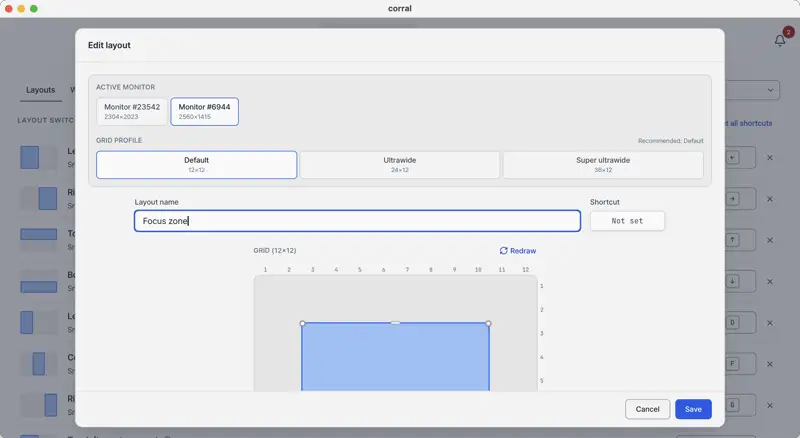
Design window zones with monitor-aware 12×12, 24×12, or 36×12 grid profiles, then apply them with a shortcut or drag.
Swap positions of two windows with a single shortcut.
Drag a window to a screen edge or corner and Corral tiles it automatically with a live preview, even across mixed-DPI monitors.
See live resize ratios without losing focus on your current window while adjacent windows stay aligned.
Keep layouts, shortcuts, Window Snap, Sticky Resize, snapshots, and exclusions separate for each activity.
Review product updates and actionable notices in one inbox without interrupting your current window.
Report a problem or share an idea, then follow replies, status changes, comments, and votes inside Corral.
SIMPLE PRICING
Keep the essentials on Free. Get Pro with a one-time purchase, not a subscription.
No sign-in needed for beta window-management features. Cloud sync and other server-connected features still require sign-in.
$0forever
$6.99Regular price $9.99 Launch price until
$9.99one-time purchase
Purchases open in
Purchases will be available from this time.
Use Pro window-management features without signing in during the beta. Cloud sync and other server-connected features still require sign-in. The Free plan remains available after the beta. Signed-in users can start a 14-day Pro free trial. Pro is available as a one-time purchase for $6.99 during the launch sale ($9.99 afterward).
Use Pro window-management features without signing in during the beta. Cloud sync and other server-connected features still require sign-in. The Free plan remains available after the beta. Signed-in users can start a 14-day Pro free trial. Pro is available as a one-time purchase for $9.99.

LESS REARRANGING. MORE DOING.
Download the macOS DMG from the official release page, or get Corral from the Microsoft Store on Windows.